> ## Documentation Index
> Fetch the complete documentation index at: https://docs.salescaptain.com/llms.txt
> Use this file to discover all available pages before exploring further.
# Introduction
> Welcome to the SalesCaptain API Reference — your gateway to integrating powerful CRM, automation, and lead management features directly into your applications.
The SalesCaptain API enables developers to seamlessly interact with core platform features including:
* Company & account management
* Contact and lead handling
* Conversations and messaging
* Custom field management
* Communication channel profiles
Whether you're building a SaaS platform, CRM integration, or automation workflow, our APIs provide a scalable and flexible solution.
Use this documentation to explore endpoints, test APIs, and integrate SalesCaptain features efficiently into your system.
***
## **How to Use This API**
There are two primary ways to work with the SalesCaptain API:
### 1. OpenAPI Specification
* Use for direct API integration
* Supports tools like Postman, Swagger, and SDK generation
### 2. Interactive Documentation (MDX)
* Embedded examples and UI-based testing
* Ideal for frontend developers and quick testing
***
## Authentication
All API requests require authentication using a Bearer Token.
### Steps:
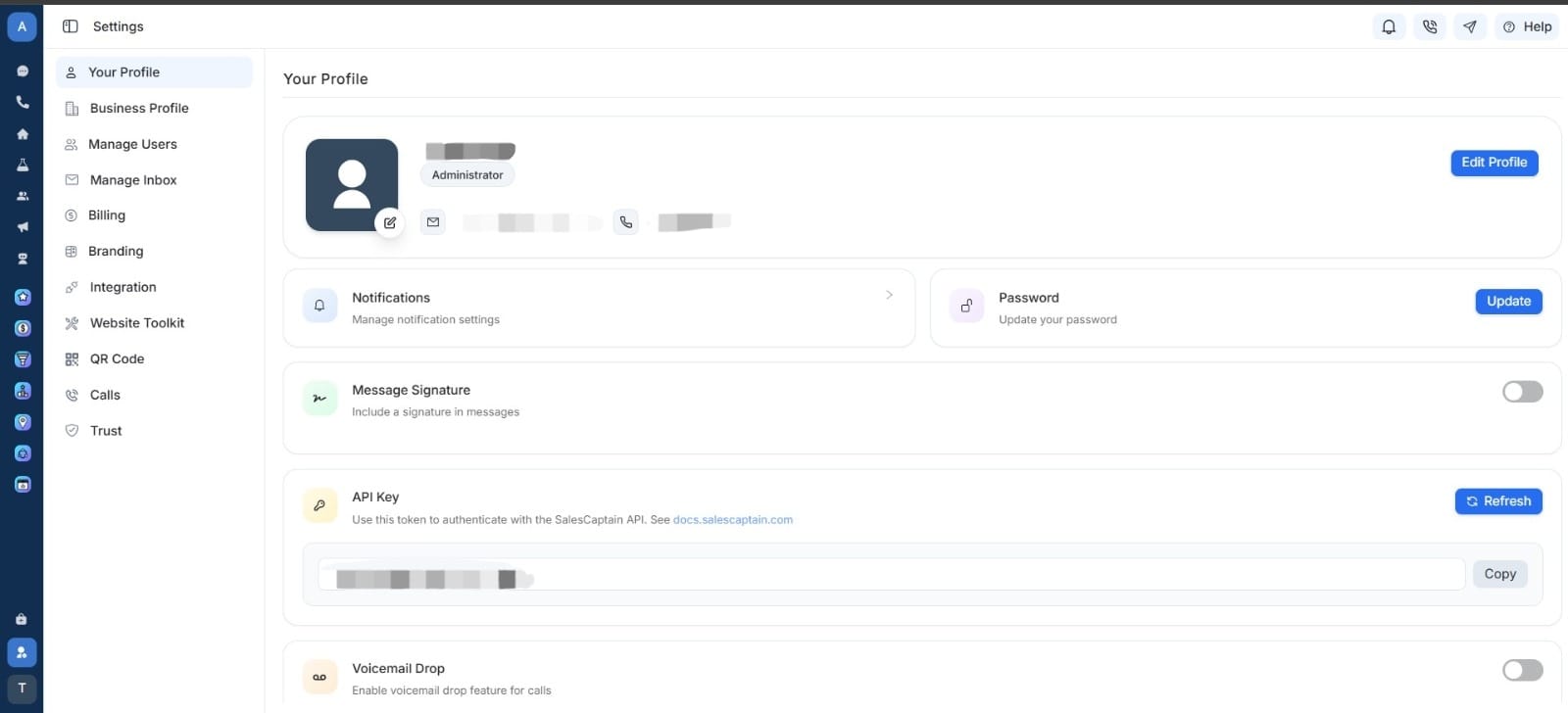
1. Generate your API key from the **SalesCaptain** [Dashboard](https://app.salescaptain.com/dashboard/settings/your-profile):\
**Sidebar → Settings → Your Profile → API Key**\
You can copy your API key from there.
 2. Include the API key in every request header as a Bearer Token.
### Example:
```text theme={null}
Authorization: Bearer YOUR_API_TOKEN
```
### OpenAPI Security:
```text theme={null}
"security": [
{
"BearerAuth": []
}
]
```
***
## API Modules
The SalesCaptain API is organized into the following resources:
### Companies
Manage company-level data.
| Method | Endpoint | Description |
| :----- | :---------------------------- | :----------------------- |
| GET | `/fetch-companies` | Retrieve all companies |
| GET | `/fetch-company/{company_id}` | Retrieve a company by ID |
***
### Accounts
Access user accounts linked to companies.
| Method | Endpoint | Description |
| :----- | :--------------------------------- | :-------------------------- |
| GET | `/fetch-all-accounts/{company_id}` | Retrieve all accounts by ID |
| GET | `/fetch-account/{account_id}` | Retrieve an account by ID |
***
### Conversation Profiles
Represents communication channels (phone, email, etc.).
| Method | Endpoint | Description |
| :----- | :----------------------------------------------------- | :------------------------- |
| GET | `/list-conversation-profiles/{company_id}` | List conversation profiles |
| GET | `/list-conversation-profile/{conversation_profile_id}` | Get profile by ID |
***
### Conversations
Manage conversations between contacts and businesses.
| Method | Endpoint | Description |
| :----- | :-------------------------------------- | :--------------------- |
| GET | `/list-conversations/{company_id}` | List conversations |
| GET | `/fetch-conversation/{conversation_id}` | Get conversation by ID |
***
### Messages
Retrieve messages within conversations.
| Method | Endpoint | Description |
| :----- | :----------------------------------------------- | :----------------- |
| GET | `/fetch-message/{message_id}` | Get message by ID |
| POST | `/send-message/{company_id}/{conversation_id}` | Send message by ID |
| GET | `/fetch-messages/{company_id}/{conversation_id}` | List messages |
***
### Contacts
Create, update, and manage contacts.
| Method | Endpoint | Description |
| :----- | :------------------------------------------ | :---------------- |
| POST | `/create-contact` | Create a contact |
| PUT | `/update-contact/{contact_id}` | Update a contact |
| GET | `/list-contacts/{company_id}` | List contacts |
| GET | `/fetch-contact/{contact_id}` | Get contact by ID |
| DELETE | `/delete-contact/{company_id}/{contact_id}` | Delete a contact |
***
### Custom Fields
Manage structured custom data for contacts.
| Method | Endpoint | Description |
| :----- | :------------------------------------- | :--------------------- |
| GET | `/list-custom-fields/{company_id}` | List custom fields |
| GET | `/list-custom-field/{custom_field_id}` | Get custom field by ID |
2. Include the API key in every request header as a Bearer Token.
### Example:
```text theme={null}
Authorization: Bearer YOUR_API_TOKEN
```
### OpenAPI Security:
```text theme={null}
"security": [
{
"BearerAuth": []
}
]
```
***
## API Modules
The SalesCaptain API is organized into the following resources:
### Companies
Manage company-level data.
| Method | Endpoint | Description |
| :----- | :---------------------------- | :----------------------- |
| GET | `/fetch-companies` | Retrieve all companies |
| GET | `/fetch-company/{company_id}` | Retrieve a company by ID |
***
### Accounts
Access user accounts linked to companies.
| Method | Endpoint | Description |
| :----- | :--------------------------------- | :-------------------------- |
| GET | `/fetch-all-accounts/{company_id}` | Retrieve all accounts by ID |
| GET | `/fetch-account/{account_id}` | Retrieve an account by ID |
***
### Conversation Profiles
Represents communication channels (phone, email, etc.).
| Method | Endpoint | Description |
| :----- | :----------------------------------------------------- | :------------------------- |
| GET | `/list-conversation-profiles/{company_id}` | List conversation profiles |
| GET | `/list-conversation-profile/{conversation_profile_id}` | Get profile by ID |
***
### Conversations
Manage conversations between contacts and businesses.
| Method | Endpoint | Description |
| :----- | :-------------------------------------- | :--------------------- |
| GET | `/list-conversations/{company_id}` | List conversations |
| GET | `/fetch-conversation/{conversation_id}` | Get conversation by ID |
***
### Messages
Retrieve messages within conversations.
| Method | Endpoint | Description |
| :----- | :----------------------------------------------- | :----------------- |
| GET | `/fetch-message/{message_id}` | Get message by ID |
| POST | `/send-message/{company_id}/{conversation_id}` | Send message by ID |
| GET | `/fetch-messages/{company_id}/{conversation_id}` | List messages |
***
### Contacts
Create, update, and manage contacts.
| Method | Endpoint | Description |
| :----- | :------------------------------------------ | :---------------- |
| POST | `/create-contact` | Create a contact |
| PUT | `/update-contact/{contact_id}` | Update a contact |
| GET | `/list-contacts/{company_id}` | List contacts |
| GET | `/fetch-contact/{contact_id}` | Get contact by ID |
| DELETE | `/delete-contact/{company_id}/{contact_id}` | Delete a contact |
***
### Custom Fields
Manage structured custom data for contacts.
| Method | Endpoint | Description |
| :----- | :------------------------------------- | :--------------------- |
| GET | `/list-custom-fields/{company_id}` | List custom fields |
| GET | `/list-custom-field/{custom_field_id}` | Get custom field by ID |